
Download ZMO.AI – AI‑Powered Background Remover, Model Generator & Photo Editing Tool
Overview
ZMO.AI is a cloud‑native, AI‑driven image‑editing platform that simplifies background removal, object erasing, and virtual‑model creation for anyone with an internet connection. Built on state‑of‑the‑art deep‑learning models, the service can detect fine details such as hair strands, semi‑transparent fabrics, and intricate edges, delivering results that rival desktop‑grade editors like Photoshop. Because the heavy lifting happens on ZMO’s GPU‑accelerated servers, users experience near‑instant processing times even when handling high‑resolution files.
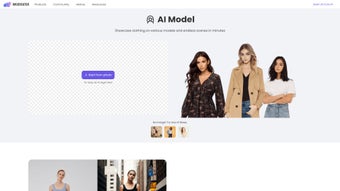
The platform also introduces an “AI Model” feature, allowing marketers, e‑commerce managers, and designers to upload clothing items and instantly dress a library of diverse virtual mannequins. This eliminates costly photoshoots, model fees, and location scouting while keeping visual quality high. ZMO.AI’s subscription model includes a free tier for light users and premium plans that unlock unlimited processing, higher‑resolution exports, and priority GPU queues.
Security is baked in: all uploads travel over HTTPS, are encrypted at rest, and are automatically purged after 30 days unless saved in a personal library. Whether you need a single product shot or batch‑process an entire catalog, ZMO.AI promises a fast, secure, and cost‑effective workflow that works on any modern browser, making it an attractive alternative for both professionals and hobbyists.
Key Features, Pros & Cons
- One‑Click Background Remover: AI automatically isolates subjects and removes complex backgrounds with edge‑preserving precision.
- Magic Object Eraser: Removes unwanted items and intelligently fills the gap using surrounding pixels.
- AI‑Generated Virtual Models: Upload garments and instantly see them on a range of body types, poses, and ethnicities.
- Extensive Background Library: Choose from studio, outdoor, and lifestyle scenes that are updated monthly.
- Batch Processing Engine: Queue dozens of images for simultaneous processing, saving hours of manual work.
- Cloud‑Based Security: End‑to‑end encryption, GDPR‑compliant storage, and automatic data expiration.
- Automatic Feature Updates: New AI models, background packs, and UI enhancements are pushed without user intervention.
- Cross‑Platform Accessibility: Runs on any device with Chrome, Edge, Firefox, or Safari—including Windows, macOS, Linux, iOS, and Android.
Pros
- Lightning‑fast processing thanks to server‑side GPU acceleration.
- No installation required; simply log in through a secure web portal.
- High‑resolution exports up to 4K for premium users.
- Cost‑effective subscription compared to hiring photographers or buying expensive desktop suites.
- Intuitive drag‑and‑drop interface that requires no design background.
- Responsive design works equally well on tablets and large monitors.
Cons
- Requires a stable internet connection; offline editing isn’t possible.
- Subscription pricing may deter occasional users who need only occasional edits.
- Limited manual mask refinement compared to full‑featured raster editors.
- Specialized fashion styles sometimes need custom model requests.
- Free tier caps at 10 images per month, which may be restrictive for small businesses.
Overall Rating: 4.5/5 – ZMO.AI delivers a compelling mix of speed, realism, and convenience, making it a standout choice for both professionals and enthusiasts.
Installation, Compatibility & Usage Guide
Because ZMO.AI is entirely cloud‑based, there is no traditional download or installation process. Users simply navigate to zmo.ai, create an account, and begin uploading images. The platform supports the latest versions of Chrome, Edge, Firefox, and Safari, ensuring broad accessibility across desktop and mobile devices. For optimal performance, a broadband connection of at least 10 Mbps is recommended; faster speeds reduce latency during batch uploads.
Step‑by‑Step Onboarding (≈ 300 words)
- Account Creation: Register with an email address or use Google/Apple single‑sign‑on. Verify the account via the confirmation email.
- Select a Pricing Plan: Choose the free tier (10 images/month) or a paid subscription that unlocks unlimited processing, higher‑resolution output, and priority GPU queues.
- Upload Files: Drag‑and‑drop or click the upload button. Accepted formats are JPEG, PNG, and WebP, with a maximum file size of 25 MB.
- Choose a Tool: Pick “Background Remover” for full background extraction, “Magic Remover” for object deletion, or “AI Model” to dress a virtual mannequin.
- Configure Settings: Adjust output resolution, select a new background from the library, or apply lighting presets to match your brand aesthetic.
- Process & Download: Click “Apply”. The AI runs on ZMO’s servers and returns the final image within seconds. Download directly or share to social platforms with one click.
Compatibility Details
ZMO.AI works on any device that runs a modern web browser, including:
- Windows 10/11 (Chrome, Edge, Firefox)
- macOS 12+ (Safari, Chrome, Firefox)
- Linux distributions with Chromium‑based browsers
- iOS 14+ (Safari, Chrome)
- Android 9+ (Chrome, Firefox)
The responsive UI adapts to screen sizes from 5‑inch smartphones to 27‑inch desktop monitors, ensuring a consistent experience across all platforms.
FAQ & Conclusion
Is my data safe when I upload images to ZMO.AI?
Yes. All uploads travel over HTTPS, are encrypted at rest, and are automatically deleted after 30 days unless you store them in your personal library.
Can I use ZMO.AI for commercial projects?
Absolutely. The paid subscription includes a commercial‑use license, allowing you to incorporate generated images into marketing campaigns, product catalogs, and client deliverables without additional royalties.
What resolution can I export?
Premium users can export up to 4K (3840 × 2160 px). The free tier is limited to 1080p, which is still ideal for web and social media use.
Do I need any special hardware?
No. All processing runs on ZMO’s cloud GPUs, so even low‑spec laptops, tablets, or smartphones can handle the workflow.
How often are new AI models and background packs added?
ZMO releases fresh model poses, clothing styles, and background collections on a monthly basis. Subscribers receive these updates automatically.
Conclusion – Why Download ZMO.AI Today?
If you need a fast, secure, and affordable solution for background removal, object erasing, and virtual‑model creation, ZMO.AI checks every box. Its AI‑driven engine delivers studio‑quality results in seconds, while the cloud‑only architecture guarantees you always have the latest features without manual updates. The cross‑platform design means you can work from a Windows PC, a MacBook, an Android tablet, or an iPhone with equal ease. Whether you run an e‑commerce store, manage a brand’s social media, or simply enjoy creating eye‑catching visuals for personal projects, ZMO.AI empowers you to produce high‑impact content in minutes instead of hours. Ready to experience the future of image editing? Click the button below to start your free trial and see how effortless background manipulation can boost your visual workflow.



.png)



